Now that we have all of our finance numbers, we are ready to begin plugging them in and setting our budget.
I call ours “Expense Breakdown 20251105”. I have used this date format for years as it ensures that all the files are in date order. If you use 11052025 then all of your November files will be together and you have to make sure you are working on the most recent November file. If you have it in year order then all you have to do is scroll to the 11th file of 2025 and find the one you want.
Anyway…back to the budget.
I will walk through how our budget sheet is set up, but mine may not work for you as you may have more or fewer than we do. Or you may not like this set up and want to organize it your way. Either way, you have to start somewhere. We went through a lot of variations until we found this one and it has proven to work well for us. It’s basic and easy to manage. Other may like to have things all in one column, versus in portrait layout so you can manipulate the data more easily.
To start: List out each of your monthly expenses. Example below
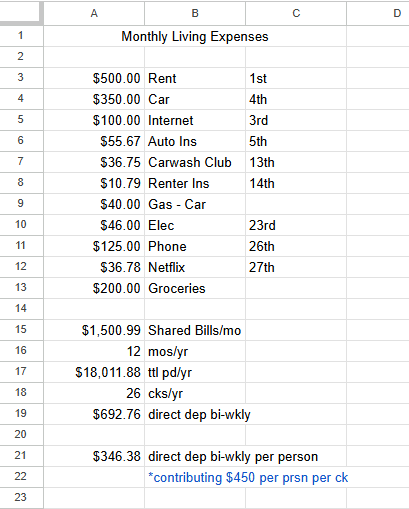
To add the $ to each amount, click on the $ icon in the menu bar.
To calculate your Shared Bills/mo in the cell you will click on the Functions icon (looks like an M on it’s side) in the menu bar and click Sum then use your mouse to highlight the amounts in column A and press enter.
Next we have the number 12 to represent 12 months per year. Then we have it multiplying out to show much we pay ttl pd/yr. After that we have the number 26, since we are paid bi-wkly, we get paid 26 times a year.
To calculate the total per paid per year, put select that cell and type the equal sign and then click the amount of Shared Bills/mo and type * and then click the 12 and press enter. If I stepped it out correctly then it should have calculated for you.
To do the direct dep bi-wkly calculation, select that cell and type the equal sign then click the ttl pd/yr and type / then click the 26 and press enter. Again, this should calculate out for you.
For the last amount we did the same as above but just / the direct dep bi-wkly by 2 instead of 26.
We added our due dates in the third column so we know exactly when each item is due. We also have everything, excluding Gas-Car and Groceries, set to auto pay because it’s just easier to pay that way. We have them set up through that specific bill website, rather than directly from our checking account.
Rather than only having the exact amount of money for bills, we always add a little extra each check because some things fluctuate unexpectedly. Also, having the small cushion is very helpful. If at the end of the year, you have a lot of extra in there, you can always half it and split it between you.
In our case, it’s me and my roommate daughter. We have a joint account that we use for all our shared bills. We have been roommates since 2018 and this has worked well for us. What works for us may not work for nonrelated roommates. It will work very well if you are a married couple. Put your bill money into the joint account and have the rest in your own…or a percentage of it at least. Then you each have your own “pocket money” for lunch money, new shoes, or whatever you do on your own.
Our budget spreadsheet also contains our paycheck breakdowns so we know how much we make an hour, week, year. How much comes out in taxes and job benefits. Just easier to have it all in one view versus having to do brain math at the most inopportune times. Besides…I’m not much a brain math person anyway. HAHA!
Don’t forget to save your spreadsheet before you close it out. Never rely on it doing an autosave. I did that before and closed it before it did the autosave. Oops!
Best of luck!

 i am what you read
Leave a comment